> For the complete documentation index, see [llms.txt](https://help.sequorplatform.io/llms.txt). Markdown versions of documentation pages are available by appending `.md` to page URLs; this page is available as [Markdown](https://help.sequorplatform.io/documentacao/documentation-en/sequor-mes/titan-collection/setup-module.md).
# Setup Module
The module of **Setup** Sequor MES was developed to control and track all the preparation activities required before the effective start of a production operation.
In industrial routines, it is common for equipment and workstations to require adjustments, tool changes, device preparation, or specific settings before starting the manufacture of a new product or batch. Although these activities do not generate production directly, they significantly impact operational efficiency, production capacity, and plant performance indicators.
Through Setup control, Sequor MES allows the structured recording of all time spent preparing production resources, providing greater visibility into the activities performed, traceability of operations, and support for continuous process improvement.
In addition to controlling the time spent on each preparation, the system makes it possible to compare planned time with the time actually spent, identify setup reduction opportunities, analyze operational bottlenecks, and contribute to increased equipment efficiency.
All information recorded during setup is available for consultation and analysis, allowing operators, supervisors, and managers to monitor process performance and make decisions based on real operational data.
## 1. Setup Opening and Control
The **Setup** represents the time required to prepare the equipment or workstation before the effective start of production for an operation. In Sequor MES, setup control is handled in an integrated way with the production order execution flow, allowing **time traceability**, **process standardization** and **operational efficiency analysis**.
## 2. When to use Setup
Setup should be opened whenever there is a need for:
* Tool change
* Machine adjustment
* Device preparation
* Initial settings to start the operation
* Setup between batches or different products
This time is not considered productive time, but it is essential for analyzing:
* Changeover efficiency
* Capacity planning
* OEE and operational indicators
## 3. Setup Opening Flow
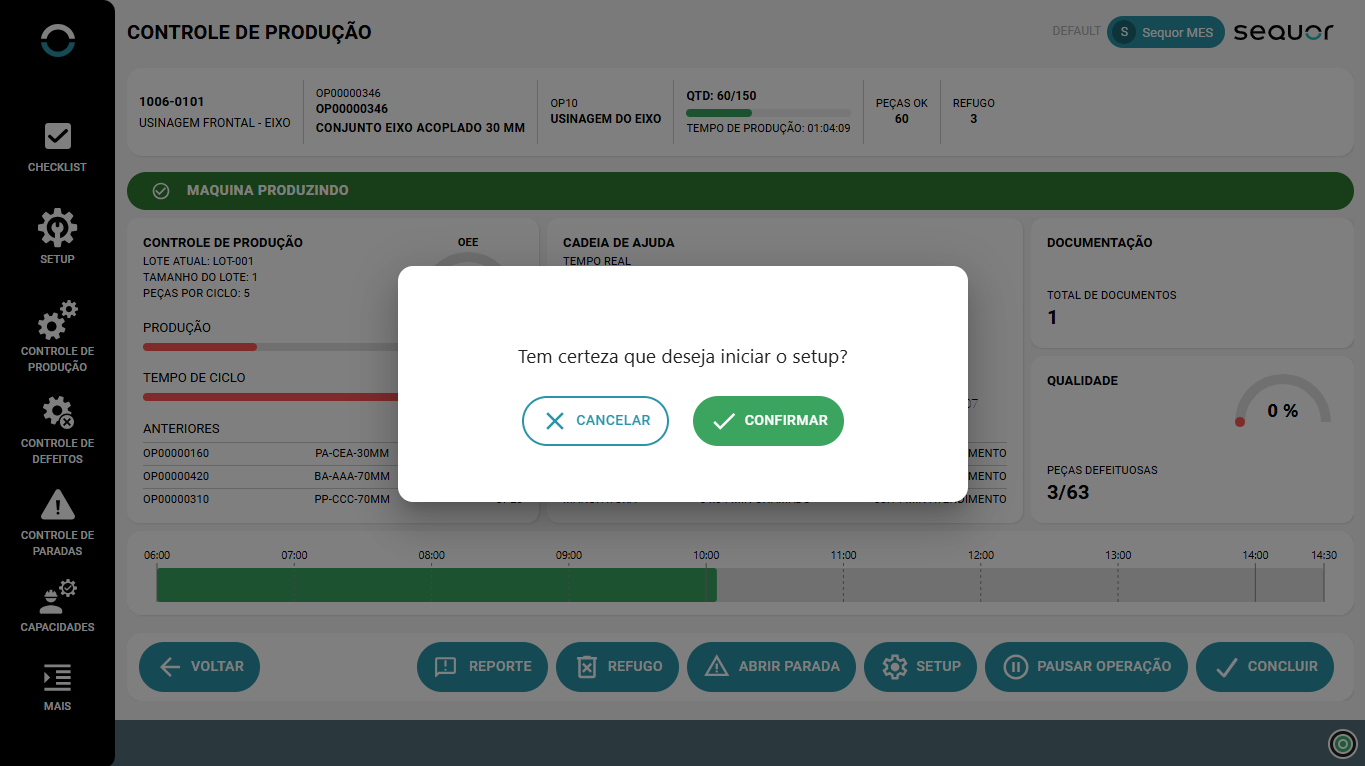
During operation execution in the **Production Control**, the operator can start setup through the **`SETUP`** button (located on the bottom bar of the screen) or through the module in the left side menu.
Setup Opening
When this option is selected, the system will display a confirmation message to prevent unauthorized openings.
Setup opening confirmation
* **Confirm**: starts the setup
* **Cancel**: returns to the production screen without starting the setup
After confirmation, the system automatically changes the operation status to **In Setup Process**.
## 4. Setup Screen
General setup information
#### Displayed information
During setup, the operator sees a dedicated screen with the following information:
**Header**
* Equipment / Workstation
* Production Order
* Operation in progress
* Quantity produced and scrap so far
**Setup Status**
* Visual indicator: **“In Setup Process”**
* Highlighted in yellow for easy identification of the status
**Time Control**
Sequor MES automatically controls setup time, displaying:
* **Standard Time**\
Time previously configured in the capacity/process, used as a reference.
* **Current Time**\
Actual time elapsed since the setup was opened.
This monitoring allows:
* Comparison between planned time x actual time
* Identification of bottlenecks
* Historical analysis of setup efficiency
**Tools and Resources**
On the side of the screen, the system displays the list of **tools and devices** associated with the operation, helping the operator during equipment preparation.
Examples:
* Clamping devices
* Supports
* Operation-specific tools
**History of Previous Setups**
The operator also sees a history with:
* Previously performed setups
* Associated Production Order
* Start and end date and time
This information helps to:
* Repeat best practices
* Reduce time variation between similar setups
* Increase operational predictability
## 5. Pausing or Ending the Setup
**Pause Setup**
Allows the setup to be temporarily interrupted, keeping the time control recorded up to the moment of the pause.
**End Setup**
When finishing the preparation, the operator must select **End Setup**.
The system requests confirmation:
> *“Are you sure you want to end the setup?”*
End confirmation
After confirmation:
* The total setup time is consolidated
* The system automatically returns to the state of **Production**
* The operation is ready for production reporting
## 6. Integration with Production Control
* The setup time **does not directly affect** production reporting directly
* The data is recorded for performance analysis
* Setup makes up indicators such as:
* Non-productive time
* Changeover efficiency
* OEE (when applicable)
## 7. Benefits of Setup Control in Sequor MES
* Complete traceability of preparation time
* Standardization of the setup process
* Reduction of operational variations
* Solid foundation for continuous improvement
* Support for planning and capacity decisions
* Clear visibility for operators, supervisors, and management